
Computer UPS and Battery Backup
Computer UPS and battery backup products are designed to help protect computers, monitors, routers, storage devices and other compatible equipment during power cuts, dips and unstable mains power. They can provide temporary battery power so you have time to save work, shut down safely or keep essential devices running for a short period, depending on the product and load connected.
The right UPS should match the equipment you want to protect, the amount of power it uses and how long you need backup power for. Capacity, socket type, battery runtime, surge protection, display features, software support and device compatibility are all worth checking carefully before buying.
- Computer UPS and Battery Backup
APC BX1500M 1500VA UPS Battery Backup and Surge Protector
£385.24 *View On Amazon* - Computer UPS and Battery Backup
Mini UPS Portable Battery Backup Power Bank with LED Indicator
£40.98 *View On Amazon* - Computer UPS and Battery Backup
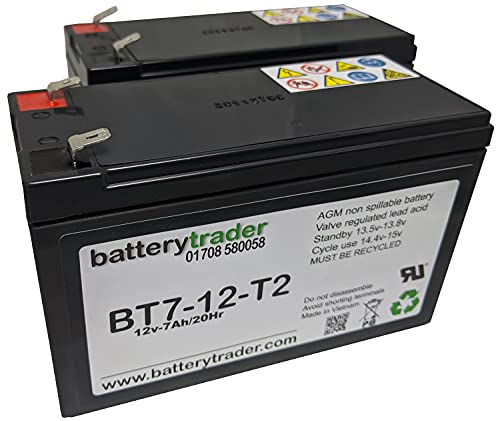
BatteryTrader® battery compatible with APC RBC132 for back up computer UPS
£149.00 *View On Amazon* - Computer UPS and Battery Backup
Yangers Mini UPS 12V Uninterruptable Power Supply, 13500mAh Li-ion Portable Battery Backup Power Device with Multi DC Output 9V 12V USB 5V
£31.99 *View On Amazon* - Computer UPS and Battery Backup
CyberPower CP1500EPFCLCD-UK Backup UPS PFC Pure Sinewave 1500VA/900W, 2 x UK Sockets, 4 x IEC
£395.00 *View On Amazon* - Computer UPS and Battery Backup
Mini UPS Battery Backup 10400mAh Intelligent Uninterruptible Power Supply
£28.49 *View On Amazon* - Computer UPS and Battery Backup
BatteryTrader® Battery Compatible with APC RBC24 UPS Backup Battery Pack
£149.00 *View On Amazon* - Computer UPS and Battery Backup
BatteryTrader® Battery Compatible with APC Smart UPS SU1400I 12V 18Ah
£159.99 *View On Amazon* - Computer UPS and Battery Backup
BatteryTrader® Battery Compatible with Unitek Alpha 1600/1650 UPS, AGM VRLA, 2-Pack
£89.99 *View On Amazon* - Computer UPS and Battery Backup
BatteryTrader® APC MATRIX MX3000 compatible UPS batteries 12V 75Ah
£999.00 *View On Amazon* - Computer UPS and Battery Backup
BatteryTrader® Battery Compatible with APC BK400, BK400B and BK500M UPS
£53.50 *View On Amazon* - Computer UPS and Battery Backup
BatteryTrader® Battery Pack Compatible with APC BE350T UPS
£53.49 *View On Amazon* - Computer UPS and Battery Backup
BatteryTrader® APC SU5000RMT5UXFMR Compatible UPS Batteries AGM VRLA
£449.00 *View On Amazon* - Computer UPS and Battery Backup
BatteryTrader® Battery Compatible with MGE Evolution 850VA Tower UPS, AGM VRLA, 2 Pack
£89.99 *View On Amazon* - Computer UPS and Battery Backup
BatteryTrader® battery compatible with UNITEK EPSILON 2000 Computer Back Up UPS Batteries AGM VRLA – 4 Pack
£149.00 *View On Amazon* - Computer UPS and Battery Backup
BatteryTrader® Battery Compatible with Exide Powerware PW9120 BAT 700 EBM UPS Batteries AGM VRLA
£89.99 *View On Amazon* - Computer UPS and Battery Backup
Eaton Serie 3S 3S550B UPS 550VA 330W Black and White
Original price was: £83.99.£55.84Current price is: £55.84. *View On Amazon* - Computer UPS and Battery Backup
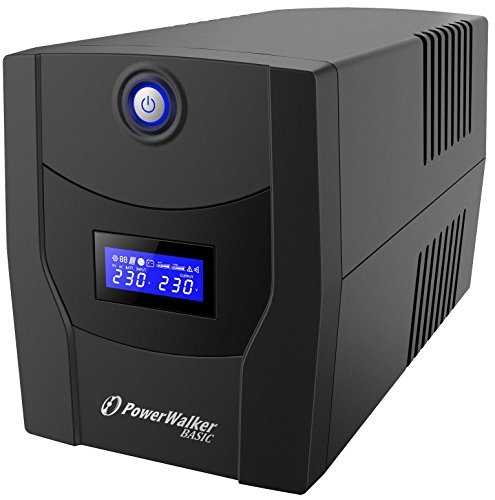
PowerWalker UPS VI 2200VA/1200W LCD IEC Uninterruptible Power Supply
£179.99 *View On Amazon* - Computer UPS and Battery Backup
APC Back-UPS BX750MI 750VA Battery Backup & Surge Protector
£99.99 *View On Amazon* - Computer UPS and Battery Backup
APC by Schneider Electric Back-UPS CS BK650EI Uninterruptible Power Supply 650VA, 4 IEC Outlets
£167.97 *View On Amazon* - Computer UPS and Battery Backup
APC by Schneider Electric Back-UPS Pro BR1600MI UPS 1600VA, Black
£200.48 *View On Amazon* - Computer UPS and Battery Backup
APC Back-UPS BE1050G2-UK 1050VA UPS Battery Backup with AVR, 8x BS1363A Outlets, 2 USB Charger Ports
£153.55 *View On Amazon*






What Are Computer UPS and Battery Backup Products?
A computer UPS, or uninterruptible power supply, is a power protection device that sits between your mains socket and your computer equipment. When the mains power fails or becomes unstable, the UPS can switch to battery backup where suitable, helping connected devices keep running for a limited time.
Products in this category may include desktop UPS units, home office battery backups, network UPS devices, surge protected UPS units, line interactive UPS models, tower style UPS units and replacement battery compatible systems where listed.
Some models are intended for basic home use, while others may support more demanding computer, office or network setups. Features vary widely, so it is important to check each product description carefully.
What Are Computer UPS and Battery Backup Products Used For?
Computer UPS and battery backup products are used to protect important equipment from sudden power loss and give users time to respond. They can be useful for desktop PCs, workstations, monitors, broadband routers, network switches, NAS storage, external drives, tills, office equipment and compatible home technology.
For home offices, a UPS can help prevent work being lost during a power cut. For gaming PCs, it can give time to exit safely and shut down. For network equipment, a UPS may help keep internet or local network devices running briefly, depending on the load and product capacity.
They are also useful in areas where power dips, brief outages or unexpected shutdowns are a concern.
How To Choose The Right Computer UPS Or Battery Backup
Start by listing the equipment you want to connect. A desktop PC and monitor may need a different UPS from a router and small network switch. The total power demand of all connected devices must be suitable for the UPS capacity.
Next, think about your goal. If you only need enough time to save files and shut down, a smaller UPS may be suitable where compatible. If you want to keep a router, modem or NAS running for longer, compare runtime guidance carefully where listed.
Socket type matters too. Check the number and type of output sockets, whether they provide battery backup, surge protection or both where listed, and whether they suit your plugs and cables.
Also check software support. Some UPS units may connect to a computer by USB or network features where listed, allowing shutdown software or monitoring. This can be useful for desktops, servers or NAS systems, but compatibility varies.
Key Features To Compare
When comparing computer UPS and battery backup products, look at power capacity, battery runtime, socket layout, supported load, battery type, display or alarm features, surge protection where listed, automatic voltage regulation where stated and software compatibility.
Capacity is one of the most important details. A UPS must be able to handle the connected equipment. If the connected load is too high, the UPS may not work as expected or may provide very little backup time.
Runtime should be viewed carefully. Backup time depends on the product, battery condition and how much equipment is connected. A lighter load may run for longer, while a gaming PC or workstation may drain the battery more quickly.
Display screens, warning lights and audible alarms where listed can help you understand battery status, overload warnings or power events. These details can make day to day use easier.
UPS Units Compared With Surge Protectors Power Strips And Portable Power Stations
A UPS is different from a normal surge protected extension lead because it includes battery backup where listed. A surge protector may help protect against certain voltage spikes, but it does not usually keep devices running during a power cut.
A standard power strip adds extra sockets, but it does not provide battery support unless specifically designed as a UPS product. It should not be treated as power protection for sensitive equipment.
A portable power station is a different type of product often designed for mobile power, camping or off grid use where suitable. It may not offer the same computer focused automatic switchover or shutdown support as a UPS.
For computers and network devices, a UPS is usually the more suitable choice when the goal is safe shutdown and short term backup during power interruption.
Guidance For Beginner Regular And Experienced Users
Beginners should focus on simple compatibility. Choose a UPS that supports the devices you want to connect, has suitable sockets and provides enough capacity for basic backup needs.
Regular home office users should compare runtime, software support, audible alerts and socket layout. A UPS that is easy to understand and fits neatly under or beside a desk can be more practical for daily use.
Experienced users may look more closely at load ratings, waveform type where listed, battery replacement, USB monitoring, network shutdown support, NAS compatibility and automatic voltage regulation. These details can matter more for workstations, servers, media systems and more complex setups.
Use Cases By Device And Setup
For desktop PCs, a UPS can help protect against sudden shutdowns and give time to save work. A monitor may also need to be connected if you want to see what you are doing during an outage.
For home offices, a UPS can support computers, monitors, routers and essential desk equipment where compatible. It can be useful for video calls, documents and online work, although runtime depends on the load.
For gaming setups, a UPS may provide time to exit a game and shut down properly. High power gaming PCs may need a higher capacity UPS, so check load requirements carefully.
For broadband routers and network devices, a smaller UPS may be suitable where compatible. Keeping only low power networking equipment connected may provide longer backup time than connecting a full PC setup.
For NAS storage and external drives, safe shutdown support can be important. Check whether the UPS and storage device support communication or shutdown features where listed.
For small business use, a UPS may help reduce disruption for tills, office PCs, routers or essential equipment, provided the capacity and compatibility are suitable.
Fit Compatibility And Setup Checks
Before buying, check the power requirements of the equipment you plan to connect. Look at wattage, volt amp ratings where listed, plug type and the number of devices that need battery backup.
Not every socket on a UPS may provide battery backup. Some products may include both battery backup sockets and surge only sockets where listed, so connect important equipment to the correct outlets.
If the UPS has a USB or data connection, check whether your operating system or device supports the monitoring and shutdown features. Compatibility can vary between Windows, macOS, Linux, NAS systems and specialist equipment.
Place the UPS in a ventilated, stable location. Avoid covering vents, placing it near heat sources or hiding it where alarms and displays cannot be checked.
Battery Runtime Load And Practical Expectations
Battery backup time depends on the connected load. A router and small network device may use far less power than a desktop PC, large monitor and external storage. This means runtime can vary significantly in real use.
Do not assume a UPS will keep a whole office running for long periods. Many computer UPS units are designed mainly to bridge short outages, protect against sudden shutdowns and allow safe shutdown.
If runtime is important, compare the product runtime information where listed and match it to the load you expect to connect. Remember that batteries can age over time, which may reduce backup performance.
For critical equipment, consider whether you need a more advanced UPS, spare battery planning or professional power protection advice.
Safety Care Maintenance And Storage
Computer UPS units contain batteries and should be used according to the product instructions. Do not overload the UPS, connect unsuitable equipment or use damaged plugs, cables or sockets.
Keep the UPS in a dry, ventilated place away from direct heat, damp, dust and flammable materials. Do not cover the unit or block ventilation openings.
Check alarms, indicator lights and battery warnings where listed. If the UPS reports a battery fault or overload, follow the product guidance and stop using unsuitable connections.
Batteries may need replacement after a period of use, depending on the product and conditions. Use compatible replacement batteries only where supported and follow safe disposal guidance for old batteries.
Do not open or modify a UPS unless the manufacturer instructions clearly allow it and you are competent to do so. If unsure, seek suitable technical or electrical support.
Useful Accessories To Consider
Useful accessories can include surge protected extension leads where suitable, cable organisers, USB cables, network cables, replacement batteries where compatible, power leads, external drives, NAS storage, desk organisers and monitoring software where available.
For home offices, cable management can help keep the UPS setup tidy and reduce trip hazards. For network setups, short Ethernet cables and a small shelf or cabinet may help keep routers and switches organised.
For computers, pairing a UPS with regular file backups is sensible. A UPS helps with power interruptions, but it should not replace proper data backup.
Why Buy Computer UPS and Battery Backup From YPC?
At YPC, we understand active lifestyles and the need for practical products that work in real use. Computer UPS and battery backup products can vary by capacity, runtime, socket layout, software support, battery design, protection features and compatibility, so comparing the details helps you choose with more confidence.
YPC helps you browse computer power protection products with real everyday setups in mind, whether you are buying for a home office, gaming PC, router, workstation, NAS storage or small business equipment. Explore the Computer UPS and Battery Backup category to browse the available options and compare the features that matter most for your devices.
FAQs
What is a computer UPS?
A computer UPS is an uninterruptible power supply that provides temporary battery backup to connected equipment when mains power fails or becomes unstable, depending on the product and load.
What is a UPS used for?
A UPS is used to help prevent sudden shutdowns, protect connected equipment from some power issues and give users time to save work or shut down safely during a power cut.
How do I choose the right UPS size?
Check the power use of the devices you want to connect and compare it with the UPS capacity where listed. The UPS must be suitable for the total load and the backup time you need.
Will a UPS keep my computer running for hours?
Usually not. Many computer UPS units are designed for short term backup, safe shutdown and brief outages. Runtime depends on the UPS, battery condition and connected load.
Can I plug a monitor into a UPS?
Yes, where the UPS has suitable battery backup sockets and enough capacity for the monitor and other connected equipment. Connecting a monitor can help you see the screen during an outage.
Is a UPS the same as a surge protector?
No. A surge protector may help with certain power spikes, while a UPS provides battery backup where listed. Some UPS units may also include surge protection, but features vary by product.
Can I use a UPS for a WiFi router?
Yes, a UPS can be used with a compatible WiFi router where the plugs and power requirements are suitable. Runtime may be longer for low power devices than for a full computer setup.
Do UPS batteries need replacing?
UPS batteries may need replacing after a period of use, depending on the product, age and conditions. Check the product guidance and use only compatible replacement batteries where supported.
Can I connect a printer to a UPS?
It depends on the printer and UPS. Some printers, especially laser printers, can draw high power and may not be suitable for battery backup sockets. Check both product manuals before connecting.
How should I look after a computer UPS?
Keep it dry, ventilated and not overloaded. Check warning lights or alarms, follow the product instructions, replace batteries where required and avoid using damaged cables or unsuitable equipment.
Looking for more options?
Browse our full range of Computers and Accessories for other great choices to suit your space, goals, and budget.
 Getting ready for Summer? View our Home and Garden Products

Heading outdoors this winter? Take a look at our Outdoor Clothing.