
Label Printers
Label printers are specialist printers designed to create labels for parcels, folders, shelves, stock, cables, barcodes, addresses, storage boxes and everyday organisation. They are useful for home offices, ecommerce sellers, warehouses, schools, workshops, retail counters, IT setups and anyone who needs clear labels without using a standard document printer.
The right label printer should suit the type of labels you need, the volume you print and the devices you plan to connect. When comparing options, look at label size support, print method, connection type, software compatibility, roll or tape format, print resolution where listed, print speed where listed, label material compatibility and whether the printer is intended for occasional home use, shipping labels or regular business printing.
- Label Printers
vretti Thermal Label Printer USB,Shipping Label Printer 4×6 Machine for Shipping Packages,Thermal Machine Compatible with Windows,Mac OS Systems
Original price was: £44.99.£40.49Current price is: £40.49. *View On Amazon* - Label Printers
DYMO LabelWriter 550 Turbo Label Printer | Label Maker with High-Speed Direct Thermal Printing | Automatic Label Recognition | Prints Shipping Labels & More with USB/LAN Connectivity | UK 3 Pin Plug
Original price was: £129.99.£107.74Current price is: £107.74. *View On Amazon* - Label Printers
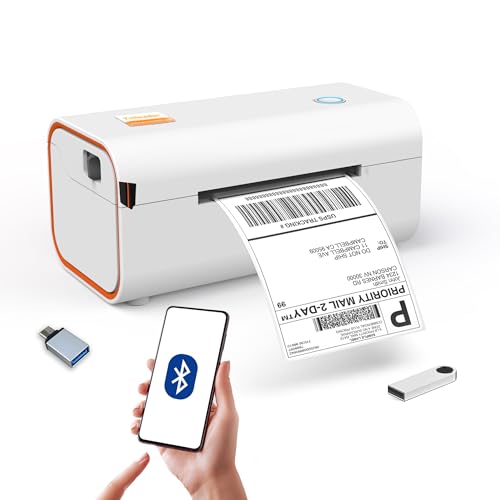
Yinleader Thermal Shipping Label Printer Bluetooth/USB, Thermal Printer 4×6, Postage Label Printer for Business, Compatible with Amazon, Royal Mail, Shopify, Ebay, DHL, DPD, Evri, UPS – White
Original price was: £45.99.£42.49Current price is: £42.49. *View On Amazon* - Label Printers
NIIMBOT Label Maker Machine with Tape,D110 New Version Portable Bluetooth Label Printer, Wireless Handheld Sticker Maker with Multiple Templates for Organizing School Office Home
Original price was: £22.99.£15.99Current price is: £15.99. *View On Amazon* - Label Printers
Phomemo 241BT Thermal Label Printer, Shipping Label Printer 4×6, No Ink, Compatible with Android, IOS & PC, Widely Used for Royal Mail, Hermes, Shopify, Amazon, FedEx, UPS. Grey
Original price was: £84.99.£65.98Current price is: £65.98. *View On Amazon* - Label Printers
Brother PTH100LBXG1 Label Printer | P-Touch Labeller | ABC Keyboard | Handheld | Light Blue
Original price was: £29.99.£23.09Current price is: £23.09. *View On Amazon* - Label Printers
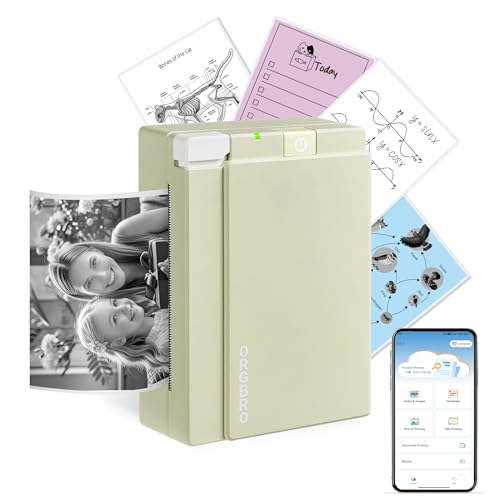
ORGBRO Sticker Printer, X3 Mini Bluetooth Thermal Portable Sticker Maker Supports 2-3 Inch Width, with 1 Roll Thermal Paper, Suitable for Study Notes, Photos, 300DPI Compatible with Phone, Olive Green
Original price was: £19.98.£9.99Current price is: £9.99. *View On Amazon* - Label Printers
DIFCUL C9 Mini Thermal Printer,Bluetooth Labler Maker,Portable Inkless Printers Compatible with Android and ios,Printable Photos,Lists,Memo,QR Codes,Notes(With 5 Roll Paper+5 Colored Pens)
Original price was: £13.88.£9.80Current price is: £9.80. *View On Amazon* - Label Printers
NelkoGlobal Bluetooth Thermal Label Printer, Wireless 4×6 Shipping Label Printer for Small Business, Compatible with Android, IOS, Windows and Mac, Widely Used for Amazon, Shopify, Ebay, Etsy, Black
Original price was: £79.99.£49.99Current price is: £49.99. *View On Amazon* - Label Printers
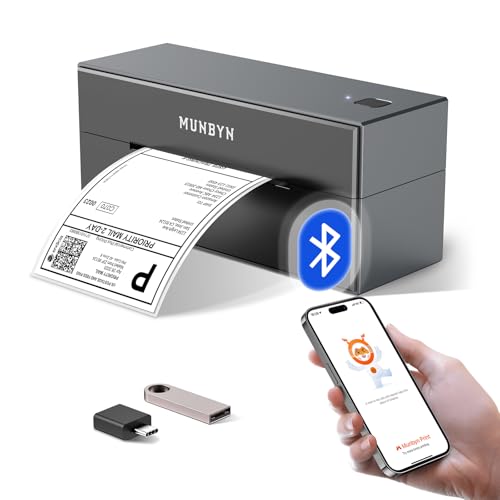
MUNBYN Bluetooth Shipping Label Printer, 4×6 Thermal Label Printer for Small Business, Compatible with iPhone, Android, Windows, macOS, Etsy, Shopify, eBay, Royal Mail, DHL, DPD, Evri, 403B, White
Original price was: £94.99.£69.98Current price is: £69.98. *View On Amazon*








What Are Label Printers
Label printers are printers made specifically for producing labels rather than full size documents. They can print onto label rolls, label tapes, sticker labels, shipping labels or specialist label media depending on the product.
Depending on the listing, a label printer may use direct thermal printing, thermal transfer printing, ink based printing or tape cassette printing where listed. It may connect by USB, WiFi, Bluetooth or network connection where supported by the product and device.
Label printers are different from standard inkjet or laser printers because they are designed around label formats, repeated small prints and practical identification tasks. They can help make labelling faster, neater and more consistent.
What Label Printers Are Used For
Label printers are used for parcel labels, address labels, barcode labels, product labels, file labels, storage labels, name labels, cable labels, shelf labels, pricing labels and general organisation labels.
For ecommerce sellers, a label printer can help with shipping labels and order processing where compatible with the selling platform and carrier labels. For offices, it can be useful for folders, post, storage boxes and equipment. For homes, label printers can help organise cupboards, school items, craft supplies and paperwork.
Workshops and IT users may use label printers for cables, tools, components, drawers and equipment identification. Retail and stockroom users may need labels for products, barcodes, shelves or inventory systems where compatible.
How To Choose The Right Label Printer
Start with the label type you need. Shipping labels, barcode labels, address labels, file labels and cable labels can require different label sizes, materials and print methods. Check the product details carefully before buying.
Next, think about print volume. Occasional home use may only need a compact label printer or label maker. Regular business use may need a faster printer, larger rolls, wider label support and more convenient connectivity where listed.
Connection type is also important. USB can be simple for a fixed desk setup. WiFi or Bluetooth where listed may be useful if several devices need access or if you want a more flexible setup. Always check compatibility with your computer, phone, tablet or operating system.
Also consider running costs and label supply. The printer may be affordable, but label rolls, tapes or cartridges need to be available and suitable for your intended use.
Key Features To Compare
Label size support is one of the first features to check. A printer designed for small address labels may not suit larger shipping labels, and a shipping label printer may not suit narrow cable labels.
Print method matters. Direct thermal printers usually print on heat sensitive labels and do not use ink, but they require suitable thermal labels. Thermal transfer printers where listed may use ribbons and suitable label media. Other label makers may use tape cassettes or other consumables.
Connection type affects setup. USB, WiFi, Bluetooth and network options where listed all suit different workspaces.
Software compatibility is essential. Check whether the printer works with your computer, phone, operating system, shipping platform, label design software or barcode system where relevant.
Print resolution where listed can affect how sharp text, barcodes and small details appear. This can matter for barcode labels or small text.
Print speed where listed may matter for businesses printing many labels each day, but it may be less important for occasional home use.
Media compatibility should be checked carefully. Label rolls, tapes, continuous labels and pre cut labels are not always interchangeable.
Label Printers Compared With Standard Printers
A standard inkjet or laser printer can print sheets of labels where compatible, but it is usually designed for documents first. It may be practical for occasional label sheets, but less convenient for repeated single labels.
A label printer is designed for dedicated label output. It can be more efficient for shipping labels, address labels, barcode labels or regular organisation tasks where the printer and media support them.
The trade off is flexibility. A standard printer can print full documents and labels, while a label printer is more specialised. If you print labels often, a dedicated label printer may be more practical.
Desktop Label Printers Compared With Portable Label Printers
Desktop label printers are usually designed to stay in one place, such as a desk, packing station, office or stockroom. They may suit regular use, larger label rolls or wider label formats where listed.
Portable label printers are usually smaller and easier to move. They may suit home organisation, field work, classrooms, workshops or occasional labelling where compact size matters.
The better choice depends on where labels are printed. Choose a desktop printer for a fixed workstation and higher volume use. Choose a portable option if you need labels in different rooms, work areas or travel settings where compatible.
Shipping Label Printers Compared With Label Makers
Shipping label printers are usually chosen for parcel labels, courier labels and larger address labels where compatible. They are often used by ecommerce sellers, warehouses and small businesses.
Label makers are often used for smaller labels, such as folders, shelves, cables, boxes and household organisation. They may use label tape or compact label media depending on the product.
The trade off is label size and purpose. A shipping label printer may be ideal for parcel workflows, while a label maker may be more useful for everyday organisation.
Guidance For Beginners, Regular Users And Business Buyers
Beginners should focus on the label size, device compatibility and consumables. A simple printer that works with the labels you actually need is better than a more complicated model with features you will not use.
Regular users may want to compare print speed, label roll capacity, connection options and software support more carefully. If labels are printed most days, ease of setup and media changes can save time.
Business buyers should think about workflow. If the printer will be used for shipping, check compatibility with carrier label formats and ecommerce platforms where relevant. If it will be used for stock labels, check barcode clarity, label size and system compatibility.
Experienced users may compare resolution, media type, network support, cutter features where listed, template software, roll handling and how easily the printer fits into an existing packing or stock system.
Use Cases By Task And Workspace
For ecommerce sellers, label printers can be useful for shipping labels, returns labels, address labels and packing station workflows where compatible.
For home offices, they can help with folders, envelopes, storage boxes, cables and paperwork.
For warehouses and stockrooms, label printers can support shelf labels, barcode labels, inventory labels and product identification where the printer and labels are suitable.
For schools and offices, they can help label files, resources, equipment, classroom storage and shared items.
For IT setups, compact label makers may be useful for cables, plugs, network equipment and device identification where compatible label tape is available.
For craft rooms and home organisation, label printers can help identify jars, drawers, containers, stationery and hobby supplies.
Fit, Compatibility And Device Matching
Compatibility should be checked before buying. Make sure the printer works with your computer, laptop, tablet or phone, and check supported operating systems where listed.
If the printer uses software or an app, check whether it suits your device and the type of labels you want to create. Some printers may need specific drivers, templates or apps to work properly.
Label media compatibility is just as important as device compatibility. Check label width, roll type, core size where listed, tape cassette type and whether pre cut or continuous labels are required.
If you plan to print barcodes or QR codes, check whether the printer and software support this clearly enough for your intended use.
If buying for a business, test the full workflow where possible, including label design, printing, peeling, scanning and application to parcels or products.
Print Quality, Barcodes And Label Durability
Print quality matters when labels need to be clear, readable and professional. Text should be easy to read, and barcodes should print clearly enough for the scanner or system being used.
Durability depends on the label material, print method and environment. Some labels may be suitable for indoor paper use, while others may be designed for tougher surfaces, moisture exposure or longer lasting identification where listed.
Direct thermal labels can be practical for shipping and short term use where suitable, but they may be sensitive to heat, light or time depending on the label material. Always check the label media details.
For long term labels, storage labels, cable labels or outdoor use, choose label media that is clearly suitable for the environment where listed.
Safety And Responsible Use
Label printers should be used with compatible power supplies, cables and label media. Do not use damaged power leads, loose connectors or unsuitable adapters.
Thermal printers can contain hot parts during operation. Follow the product instructions and avoid touching print heads or internal parts immediately after printing unless the guidance says it is safe.
Keep fingers, hair and loose items away from cutters, rollers and moving parts where present. If labels jam, switch off and follow the correct clearing instructions rather than forcing parts.
Use label printers on a stable surface with enough ventilation. Keep liquids, dust and loose paper away from the printer and power connections.
Label Storage And Running Costs
Label printers need the right consumables. Before buying, check the availability and cost of compatible label rolls, tapes, ribbons or cartridges where relevant.
Store label rolls and tapes in a clean, dry place away from heat, damp and direct sunlight. Some label materials can be affected by poor storage.
If labels are used for parcels, check whether the size matches the shipping platform or carrier requirements. If labels are used for stock or barcodes, check whether they scan properly before printing in bulk.
Buying the wrong label type can be frustrating, so compare printer compatibility and label media details carefully.
Care, Cleaning And Maintenance
Always follow the care guidance supplied with the product. Label printers may need occasional cleaning to remove dust, adhesive residue or paper particles.
Use only suitable cleaning methods and products where recommended. Do not scrape the print head or rollers with sharp objects.
Keep the label path clear and avoid using damaged or poor fitting labels that may jam. If labels feed incorrectly, check the roll installation and printer settings before continuing.
Store the printer somewhere clean and dry when not in use. If it is portable, use a case or safe storage area where suitable to protect it from knocks and dust.
Useful Accessories To Consider
Useful accessories may include compatible label rolls, label tapes, thermal labels, ribbons where required, USB cables, power adapters, storage cases, label holders, barcode scanners, shipping scales and cable organisers.
For ecommerce sellers, shipping scales, packing tape, parcel boxes and a tidy packing station can work well with a label printer. For offices, file storage, folders and cable labels may be useful additions.
If buying a label printer as a gift or business purchase, check the recipient’s device, label size needs, connection preference and the type of labels they plan to print.
Why Buy From YPC
At YPC, we understand active lifestyles and the need for practical products that work in real use. Label printers should be easy to compare by label size, print method, connection type, software compatibility, consumables, print quality where listed and suitability for home, office or business use.
This category is designed to help buyers choose practical label printers for shipping, organisation, stock control, office admin, cables and everyday labelling. Browse the label printers at YPC and compare the available options to find a suitable printer for your setup and routine.
FAQs
What is a label printer?
A label printer is a printer designed to create labels for parcels, folders, barcodes, shelves, cables, storage boxes, addresses and other identification tasks.
What are label printers used for?
Label printers are used for shipping labels, address labels, product labels, barcode labels, file labels, cable labels, stock labels and general home or office organisation.
Do label printers need ink?
Some label printers, such as direct thermal models where listed, do not use ink and need compatible thermal labels. Other types may use ribbons, tapes or different consumables, so check the product details.
How do I choose the right label printer?
Choose based on the label size you need, print volume, connection type, device compatibility, label media, software support and whether you need shipping labels, barcode labels or general organisation labels.
Can I print shipping labels with a label printer?
Yes, some label printers are designed for shipping labels where compatible. Check label size support, software compatibility and whether the printer works with your shipping platform or carrier labels.
What is the difference between a label maker and a label printer?
A label maker is often used for smaller organisation labels and may use label tape. A label printer may support larger labels, shipping labels or barcode labels depending on the product.
Can label printers print barcodes?
Some label printers can print barcodes where the printer and software support it. Check the product details, print resolution and label size before buying for barcode use.
How do I care for a label printer?
Follow the care guidance supplied with the product. Keep it clean and dry, use compatible labels, clear jams carefully, avoid forcing moving parts and clean the print area only with suitable methods where recommended.
 Getting ready for Summer? View our Home and Garden Products

Heading outdoors this winter? Take a look at our Outdoor Clothing.