

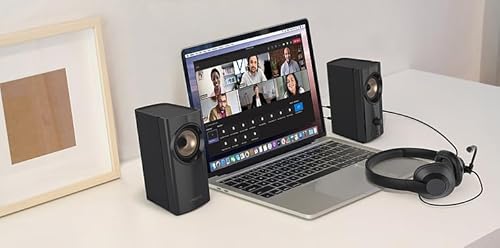


Quick Summary
CREATIVE T60 2.0 Compact Hi-Fi Desktop Speakers are desktop speakers with Clear Dialog and Surround by Sound Blaster, plus SmartComms Kit, USB-C audio, Bluetooth 5.0, and mic and headset ports. They are built for listening on a computer or laptop, with the right speaker offering direct controls for volume, Clear Dialog, Surround, and power.
The pair also includes a built-in digital amplifier and built-in DAC, and the speakers use two 2.75 inch full-range drivers. That combination will matter most to buyers who want a compact desktop setup with several connection options and on-speaker controls.
Who It Is Best For
These speakers suit buyers who want a compact desktop audio setup for a computer, laptop, or other universal analogue device with a 3.5 mm AUX-in connection. They also suit users who want quick access to audio source switching and microphone-related features from the speaker itself.
Key Details
| Detail | Verified information and buyer relevance |
|---|---|
| Product type | Compact Hi-Fi desktop speakers for desktop audio use. |
| Audio features | Clear Dialog and Surround by Sound Blaster for clearer spoken dialog and an enhanced Surround effect. |
| SmartComms Kit | Includes VoiceDetect for auto mute or unmute and NoiseClean for two-way noise cancellation. |
| Drivers | Two 2.75 inch full-range drivers. |
| Amplification and audio processing | Built-in digital amplifier and built-in DAC. |
| Connectivity | USB-C audio, Bluetooth 5.0, 3.5 mm headset and microphone jacks, and a 3.5 mm AUX-in port. |
| Controls | Volume knob, Clear Dialog button, Surround button, and power button on the right speaker. |
Why Buyers Choose It
- USB-C audio and Bluetooth 5.0 give you several verified connection options for desktop use.
- The built-in headset and microphone jacks add direct wired audio and mic connections.
- The Clear Dialog and Surround buttons place the stated sound features on the speaker itself.
- SmartComms Kit includes VoiceDetect and NoiseClean for microphone handling and background noise reduction features.
How It Works
- Connect the speakers using the preferred verified input, such as USB-C audio, Bluetooth 5.0, or the 3.5 mm AUX-in port.
- Use the right speaker controls to adjust volume.
- Press the Clear Dialog button if you want the stated clearer spoken dialog function.
- Press the Surround button if you want the stated Surround mode.
- Use the power button to turn the speaker on or switch between audio sources.
Real World Use
For day-to-day desktop listening, the speaker set gives you a compact audio system with multiple connection paths and on-speaker controls. The microphone and headset ports, together with SmartComms Kit, make it easier to manage calls or voice use from a compatible setup.
What To Know Before You Buy
Check which connection you plan to use before ordering, especially if you want USB-C audio, Bluetooth 5.0, or 3.5 mm analogue input. Confirm that your computer, laptop, or other device matches the connection you intend to use. The right speaker houses the main controls, so factor that into your desk layout.
Common Buyer Questions
What devices can these speakers connect to?
They offer USB-C audio, Bluetooth 5.0, a 3.5 mm AUX-in port, and 3.5 mm headset and microphone jacks.
Where are the controls located?
The volume knob, Clear Dialog and Surround buttons, and power button are on the right speaker.
What does SmartComms Kit add?
It includes VoiceDetect for auto mute or unmute and NoiseClean for two-way noise cancellation.
Do they include built-in audio processing?
Yes, they include a built-in digital amplifier and a built-in DAC.
Final Buying View
If you want compact desktop speakers with multiple verified connection options, onboard controls, and Sound Blaster features, this set gives you a clear specification to compare against your setup. Confirm the input you plan to use and check the desk layout around the right speaker before choosing.


