

Quick Summary
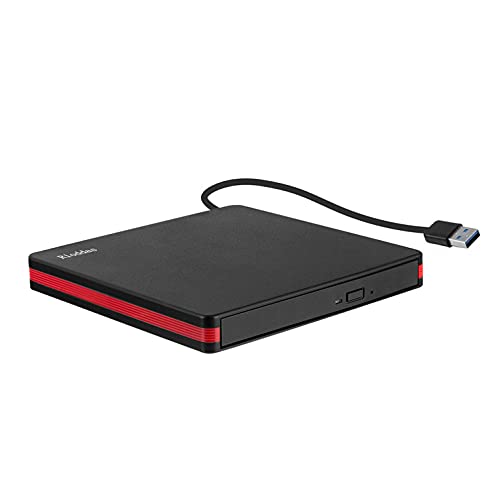
This external CD DVD drive is a portable slim optical drive with USB 3.0 and Type-C connectivity. It is set out as a CD/DVD +/-RW ROM drive burner, writer and reader for laptops and desktop computers.
The drive is described as plug and play, with no driver installation needed. It is also presented as suitable for reading and writing CDs and DVDs, with stated read and write speeds for both disc types.
Who It Is Best For
This drive suits buyers who need an external optical drive for a laptop, MacBook, PC or desktop computer with USB Type-C or USB 3.0. It also suits users who want to read discs, burn files, watch movies or install software from discs.
Check that your device has a USB 3.0 or USB Type-C connection before ordering. The drive is stated not to work with Car, TV, Projector, Chromebook OS, Tablet or Smartphone.
Key Details
| Detail | Verified information and buyer relevance |
|---|---|
| Connection | USB 3.0 and Type-C for connection to a compatible computer. |
| Product type | External CD DVD drive described as portable and slim. |
| Functions | Reader, writer, burner and ROM drive for CDs and DVDs. |
| Stated disc support | Supports CD, VCD, SVCD, CD-R/RW, DVD-R/RW and burning CD+/-RW and DVD+/-RW. |
| Stated speed | CD reading and writing speed up to 24x, and DVD reading and writing speed up to 8x. |
| Compatibility | Listed for Laptop, MacBook Pro/Air, PC, Windows 11/10/8/7/XP, Linux, and Desktop Mac OS or above. |
| Setup | Plug and play with no driver installation required. |
| Use limits | Stated not to work with Car, TV, Projector, Chromebook OS, Tablet or Smartphone. |
| Region changes | Stated to support 5 region changes in total, with one change via driver property node and four via media player. |
Why Buyers Choose It
- USB 3.0 and Type-C connection means it can be used with either supported port type on a compatible computer.
- Plug and play setup reduces the need for manual driver installation.
- Support for both reading and burning discs covers common playback and disc-writing tasks.
- Stated CD and DVD speed figures give a clearer idea of the drive’s listed operating rates.
How It Works
- Connect the drive to a computer using the USB Type-C or USB 3.0 interface.
- Allow the computer to recognise the drive automatically.
- Use it to watch movies, burn files or install software from discs.
- If disc region changes are needed, the listing states the drive supports 5 changes in total.
Real World Use
The drive can be placed in a travel bag or kept on a desk, making it easy to store between uses. It is presented for use at the office or on the road, as long as it is connected to a compatible computer.
What To Know Before You Buy
Check that your device has USB 3.0 or USB Type-C, and confirm that your system is one of the listed compatible options. Also review the stated exclusions, as the drive is not listed for Car, TV, Projector, Chromebook OS, Tablet or Smartphone use.
The region-change note is specific, so buyers who need disc playback in different regions should review that detail before ordering.
Common Buyer Questions
Does it need driver installation?
No, it is described as plug and play and should be recognised automatically within seconds.
Which devices is it listed for?
It is listed for Laptop, MacBook Pro/Air, PC, Windows 11/10/8/7/XP, Linux, and Desktop Mac OS or above.
Can it burn discs as well as read them?
Yes, it is described as a reader, writer and burner for CDs and DVDs.
Will it work with a Chromebook or smartphone?
No, it is stated not to work with Chromebook OS, Tablet or Smartphone.
Final Buying View
If you need an external slim optical drive for a compatible computer, this USB 3.0 and Type-C model covers disc reading and burning in one unit. Compare the connection type and the listed device exclusions before ordering.