



Quick Summary
This USB C PCIe card adds USB C and USB 3.0 connectivity to a desktop PC, with up to 20 W charging power on the USB C ports and USB 3.0 data transfer speeds up to 5Gbps. It is designed for PCI Express X1, X4, X8 and X16 slots, and the operating system support listed includes Windows XP, 7, 8, 10 and Mac OS 10.8.2 or higher.
The card also states support for BC1.2, QC2.0, QC3.0, AFC, PPS, FCP and USB PD2.0 / PD3.0 protocol devices. For buyers, the main checks are slot fit, operating system version and whether the connected device supports the charging protocols you want to use.
Who It Is Best For
This is for desktop PC users who want extra USB C and USB 3.0 ports through a PCI Express slot. It also suits buyers who need to check bracket fit, since both standard and low-profile brackets are included.
Key Details
| Detail | Verified information and buyer relevance |
|---|---|
| Product type | USB C PCIe card for a desktop PC. |
| Charging power | USB C ports have a maximum charging power of 20 W. |
| Data speed | USB 3.0 transfer rate is stated as up to 5Gbps. |
| Slot compatibility | Compatible with PCI Express X1, X4, X8 and X16 slots. |
| Operating system support | Listed for Windows XP, 7, 8, 10 and Mac OS 10.8.2 or higher. |
| Protocol support | Supports BC1.2, QC2.0, QC3.0, AFC, PPS, FCP and USB PD2.0 / PD3.0 protocol devices. |
| Included items | 1 USB C PCIe card, 1 low-profile bracket, 1 CD drive and 2 screws. |
Why Buyers Choose It
- USB C ports with up to 20 W charging power give a clear power specification to compare against your device’s requirements.
- USB 3.0 speeds up to 5Gbps support faster file access than slower USB connections, subject to the connected device.
- Support for multiple PCI Express slot sizes makes it easier to check whether the card will fit the available expansion slot.
- Both standard and low-profile brackets are included, which gives you bracket options for different PC cases.
How It Works
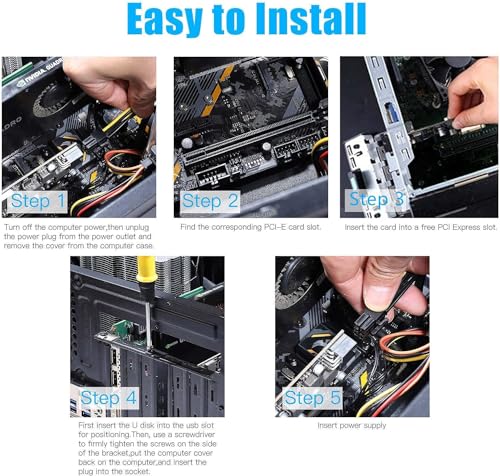
- Install the PCIe card into a compatible PCI Express X1, X4, X8 or X16 slot.
- Choose the bracket that matches your case, using the included standard or low-profile bracket.
- Install the card according to your system requirements, and use the included CD drive if your setup needs the listed drivers.
- Connect devices that you want to charge or use for data transfer, keeping in mind that the USB C charging protocols must also be supported by the connected device.
Real World Use
In day-to-day use, this card is intended to expand a desktop PC with USB C and USB 3.0 connections. The 5Gbps transfer rate is for data transfer only, and video signal transfer, DisplayPort monitor use and Thunderbolt protocol are not supported.
What To Know Before You Buy
Check your desktop’s PCI Express slot type before ordering, and confirm that your operating system matches the stated support. If you want the USB C charging features, make sure the connected device also supports the listed charging protocols. The card includes both standard and low-profile brackets, so you can match the fit to your case.
Cons: Video signal transfer, DisplayPort monitor use and Thunderbolt protocol are not supported.
Common Buyer Questions
Which PCIe slots does this card fit?
It is compatible with PCI Express X1, X4, X8 and X16 slots.
Which operating systems are listed?
Windows XP, 7, 8 and 10 are listed, along with Mac OS 10.8.2 or higher.
What is included in the box?
One USB C PCIe card, one low-profile bracket, one CD drive and two screws are included.
Does it support video over USB?
No, it is for data transfer only and does not support video signal transfer, DisplayPort monitor use or Thunderbolt protocol.
Final Buying View
This USB C PCIe card is a straightforward expansion option for a desktop PC when you need USB C and USB 3.0 through a PCIe slot. Check slot compatibility, operating system support and device protocol support before ordering.


